How to Add SEO Keywords to WordPress Website (No Plugin Needed)
Where do SEO keywords go in WordPress? Ten keyword placements that matter, the mistakes that hurt rankings, and a checklist to use before you publish.

Adding SEO keywords to a WordPress website is not about stuffing them across every page. It is about placing your primary keyword and its variations in the right areas, so your content remains.
This will help you to optimize SEO, AEO, and GEO. Because SEO helps search engines understand and rank your content, AEO focuses on making content useful and giving direct answers to an AI assistant, and GEO focuses on making content easier for generative search systems to understand and use.
In this guide, you’ll see exactly where to add keywords in WordPress, including meta titles and descriptions, URLs, headings, images, internal links, and more. By the end, you’ll know where each keyword belongs, how to use variations naturally, and which placement mistakes to avoid.
Quick Answer
Choose one primary keyword per page and add it naturally to the page title, H1, URL, meta description, introduction, and relevant headings. Use related terms in content and internal links, write descriptive image alt text, keep schema relevant, and use categories and tags wisely. Avoid keyword stuffing.
Step-by-Step: How to Add SEO Keywords to Your WordPress Website
Once you have a target keyword, the next step is placing it in the right parts of your WordPress page. Each placement should feel natural and help clarify what the page is about.
1. Page Title
Include your primary keyword naturally in the page title. Keep the title clear and relevant to the page content. Google may use the page title to create the title link shown in search results.

Example:
Primary keyword: WordPress SEO Services
Page title: WordPress SEO Services for E-Commerce
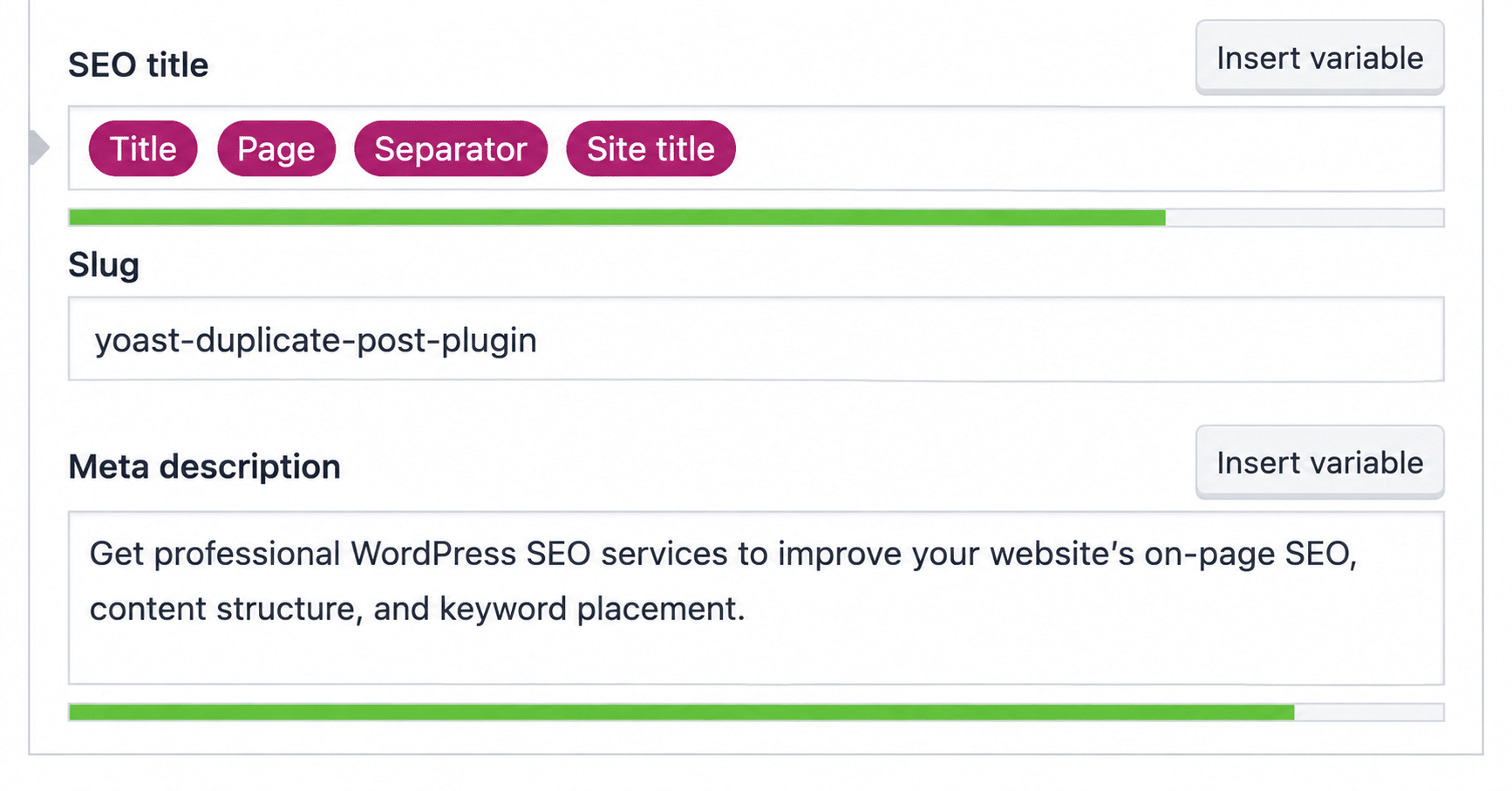
2. Meta Description
Add your primary keyword naturally to the meta description when it fits. Write a clear description that summarizes what the page offers rather than repeating the keyword.
Example:
Get professional WordPress SEO services to improve your website’s on-page SEO, content structure, and keyword placement.
3. URL Slug
Keep the URL short and descriptive, and include the primary keyword when appropriate. For example:
Good: /wordpress-seo-services/
Avoid: /page123/

Google recommends using descriptive words in URLs to help users and search engines understand the page.
4. Image Alt Text
Use relevant keywords in image alt text only when they accurately describe the image. Add keywords only if they describe what the image shows.
Example:
Image: Screenshot of a WordPress SEO settings page
Alt text: WordPress SEO settings page

5. Body Copy
Use the primary keyword naturally in the main content and include relevant variations throughout the page.
For example, a page targeting WordPress SEO Services could naturally use variations such as “SEO services for WordPress websites” and “WordPress SEO solutions” where they fit the context.
You can also use relevant keyword variations when you want to improve WordPress SEO across existing content.
6. First and Last Paragraphs
Use the primary keyword naturally in the introduction when it helps establish the topic. You can also mention the keyword or a relevant variation near the end when summarizing the page.
Do not add the keyword just to meet a target frequency. The surrounding sentence should still read naturally.
7. Headings
Use your primary keyword or relevant variations in headings when they accurately describe the section.
Example:
H1: WordPress SEO Services
H2: What WordPress SEO Services Include
H2: Choosing WordPress SEO Services for Your Website

Do not use the same keyword in every heading. Use variations where they make sense.
8. Internal Link Anchor Text
Use descriptive anchor text that tells readers what the linked page is about. If the target page is about WordPress schema markup, use that phrase as the anchor text instead of generic phrases like “click here.”

9. Schema Markup
Add relevant schema markup where it accurately represents the content on the page. Structured data gives search engines information about page content in a machine-readable format.

For example, a page about a service should use schema that accurately represents the information provided on that page.
10. Bonus: Image File Names
Use descriptive image file names before uploading images to WordPress.
Good: wordpress-seo-dashboard.jpg
Avoid: IMG12345.jpg
The file name should describe the image rather than contain a list of unrelated keywords.
Advanced Tips for Keyword Placement
Once you place your primary keyword in the main areas of a WordPress page, these practices can help you make your keyword strategy more consistent and natural.
Looking for a Ready-Made Solution?
Explore our WordPress, WooCommerce, and LMS plugins built to extend functionality without custom development.
Use Exact Keywords in Relevant Links
When adding an internal link, place the link directly on the relevant keyword or descriptive anchor text. Avoid generic anchors such as “click here,” “this guide,” “read more,” or “this fits in.”
For example, if the linked page is wooninjas.com/downloads/woocommerce-bookings, make sure to use that “WooCommerce Bookings” phrase as the anchor text instead of a generic phrase.
Use Keyword Variations
Do not rely on one primary keyword throughout the entire page. Use related terms, semantic variations, and relevant phrases to build topical authority and create semantically rich content. This helps your page target a broader range of relevant searches instead of focusing only on the WordPress SEO services keyword.
For example, a page targeting WordPress SEO services can also use phrases like SEO services for WordPress websites where appropriate.
Avoid Using the Same Keyword for Every Page
Each page should have a clear topic and target keyword. Using the same keyword across multiple pages can make it harder to distinguish which page should address a particular search intent.
Review your existing pages before assigning a new target keyword to avoid unnecessary overlap.
Use Keywords in Bullets and Tables
You can also use keywords and their variations naturally in bullet points and tables when they are relevant to the information you present.
For example, a comparison table can include terms such as WordPress SEO, keyword research, or on-page SEO when those terms accurately describe the information in the table.
Add a TL;DR or Quick Answer Block
A short TL;DR or quick answer section gives readers the main answer at the beginning of the page. Use the relevant keyword naturally and answer the main question directly.
For AEO, a concise answer makes the key information easier to identify and use in answer-focused search experiences. For GEO, a clear summary gives generative search systems a concise representation of the page’s main topic and key points. Keep the section accurate, direct, and consistent with the detailed content that follows.
Match Keyword Usage to Search Intent
The keyword you choose should match what the page is actually trying to answer or provide. Before adding keywords, make sure the content addresses the same intent as the target search.
For example, a service page targeting WordPress SEO services should focus on the service rather than trying to rank for an unrelated informational topic.
Use Categories and Tags Strategically
WordPress categories and tags can help organize related content. Use relevant categories and tags that accurately describe the post instead of creating multiple variations simply to include more keywords.
For example, a post about WordPress SEO can use a relevant WordPress SEO category rather than creating several similar categories.
Avoid Keyword Stuffing
Adding the same keyword repeatedly can make content difficult to read and may result in unnatural wording. Use your primary keyword where it is relevant, then rely on variations and related terms where they make sense.
The goal is clear, useful content, not a page filled with repeated keyword phrases.
Do You Need Yoast or SEO Plugins to Add SEO Keywords?
No. You do not need Yoast or any other SEO plugins to add SEO keywords to a WordPress website. You can place keywords directly in your page content, headings, URLs, image alt text, internal links, and other relevant areas.
SEO plugins can make these tasks easier by providing tools for managing different SEO elements from your WordPress dashboard. However, the plugin itself does not replace a clear keyword strategy.
You can compare the best SEO plugins for WordPress in 2026
WordPress SEO Keyword Placement Checklist
Before publishing a WordPress page or post, use this checklist to review your keyword placement:
- Page title: Is the primary keyword included naturally?
- Meta description: Does it describe the page clearly and use the keyword where relevant?
- URL slug: Is the URL short, descriptive, and relevant to the target keyword?
- H1: Does the main heading clearly reflect the page topic?
- Subheadings: Are relevant keyword variations used where they fit naturally?
- Body content: Is the primary keyword supported by related and semantic terms?
- Introduction: Is the main topic clear from the beginning?
- Conclusion: Does the ending reinforce the page topic naturally?
- Images: Do image alt text and file names accurately describe the images?
- Internal links: Are relevant keywords used as descriptive anchor text?
- Schema markup: Does the structured data accurately represent the page?
- Categories and tags: Are they relevant and useful for organizing the content?
- Keyword usage: Have you avoided repeating the same keyword unnecessarily?
- Search intent: Does the content actually match what the target audience is looking for?
- AEO and GEO: Is the main answer clear, concise, and easy to understand?
Use this checklist before publishing to ensure your WordPress SEO keywords fit naturally and don’t make the content feel over-optimized.
Key Takeaways
- Place your primary keyword naturally in important areas such as the title, H1, URL, introduction, body content, and relevant headings.
- Use keyword variations and related terms instead of repeating the same phrase throughout the page.
- Use descriptive anchor text for internal links and relevant keywords in image elements when they accurately describe the content.
- Structure content with clear answers and summaries to support SEO, AEO, and GEO.
- Avoid keyword stuffing and make sure your content matches search intent.
- You do not need Yoast to add SEO keywords to WordPress. A clear keyword strategy is more important than relying on a specific SEO plugin.
Conclusion
Adding SEO keywords to WordPress is not about repeating one phrase as many times as possible. It is about placing your primary keyword and relevant variations in the right areas, from titles and headings to URLs, body content, images, internal links, and schema markup.
When you apply these techniques consistently across multiple pages, keyword research, placement, content optimization, and search-intent alignment can become time-consuming. WooNinjas WordPress SEO Services can handle these tasks at scale, helping you build and maintain a consistent SEO strategy across your WordPress website.
Need help optimizing your WordPress website? Contact the WooNinjas team to discuss your SEO requirements and get started.
FAQs
Where to add keywords for SEO in WordPress?
To add SEO keywords in WordPress, start with the page title, H1, URL slug, and first paragraph. Use variations in subheadings, body copy, image alt text, and internal link anchors. Add it to the meta description too, since Google may show it as your search snippet.
How to add meta keywords in WordPress without plugin?
Skip it. Google has ignored the keywords meta tag for years, and Bing and Yahoo disregard it too. Write a unique meta description instead. If you still need meta keywords, add a custom field and output it through the wp_head hook in your child theme’s functions.php.
What are the best on-page SEO practices?
Match search intent first. Then write a unique title for each page, use one H1 with clear subheadings, keep URLs short and descriptive, and answer the main question early. Add descriptive alt text, use clear anchor text for internal links, and add schema that matches the page. Avoid keyword stuffing, since Google treats it as spam.
How to add keywords for SEO?
Pick one primary keyword per page. In WordPress, add SEO keywords to the title, H1, URL, and opening paragraph, then use natural variations in headings and body copy. Don’t chase a density number. Google’s John Mueller advises writing naturally.
Do I need any plugin for adding keywords?
No. You can add SEO keywords in WordPress without any plugin by editing your content, headings, URLs, and alt text directly. Plugins like Yoast or Rank Math just make meta descriptions, schema, and other SEO settings easier to manage.
Need Ongoing WordPress Maintenance & Support?
We handle updates, performance monitoring, security hardening, and technical fixes so your WordPress and WooCommerce site stays stable and secure.

Introducing Cannibalization Killer – Find, Fix Keyword Cannibalization Issues and Improve SEO Performance
Stop keyword cannibalization from holding your SEO back. Scan your WordPress site, find competing pages, and fix conflicts with Cannibalization…
Read More...
Updating PHP in WordPress: Step-by-Step Guide
Follow the steps to change your WordPress PHP version, test your website, and fix compatibility issues after an update.
Read More...
WordPress AI in 2026: What It Can Do and Where It Falls Short
WordPress AI can help with content, page creation, search, and automation. Compare builders, plugins, and custom integrations to find the…
Read More...
