
What if you could launch a fully functional online business in a single day, without hiring developers or spending thousands of dollars? That is exactly what WordPress business ideas make possible today.
But here’s the catch.
WordPress is taking the web industry by storm. There is now a plugin or a theme for almost any kind of website imaginable. Do you want to start an Event Management Business? Or do you need to start an affiliate program on your website? Are you planning to start an e-commerce store? Or you are looking to set up a membership forum? WordPress has a solution for you.
We have worked with several different WordPress websites for clients all around the globe. Sometimes we are surprised by how creatively people are using WordPress for business, and so we decided today that we will share with you 4 business ideas that can be set up in literally a few hours.
1- Set up a Custom T-Shirt Design Store in Minutes
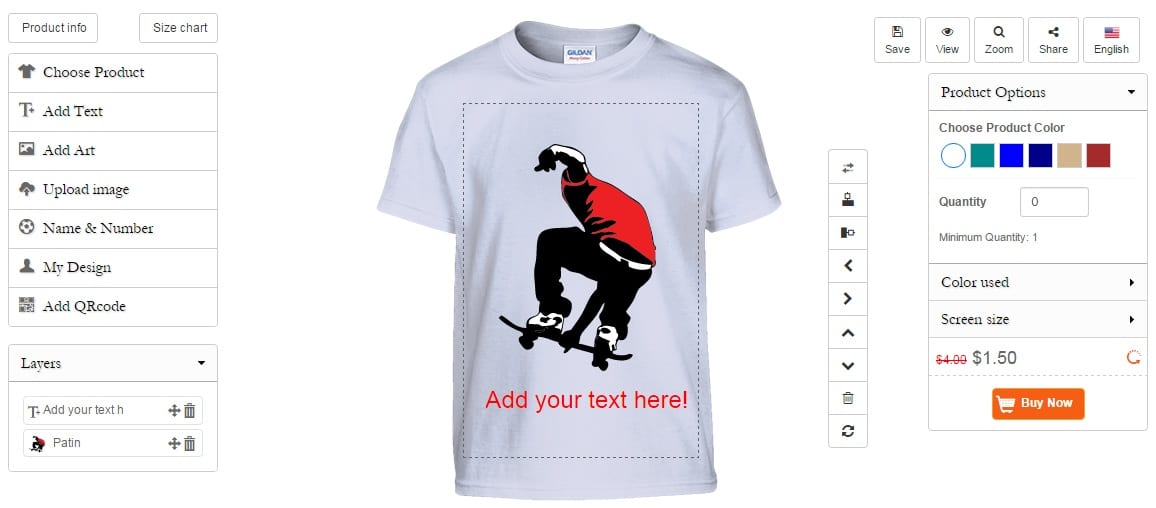
Imagine running an online store where you never touch inventory, never worry about shipping, and never deal with manufacturing.
That is the power of a custom T-shirt design business using WordPress business ideas.
This model is called print-on-demand. Instead of stocking products, you only produce items when someone places an order. Your job is to create designs and market them, everything else is handled by third-party providers.
This makes it one of the easiest and lowest-risk businesses to start.
How This Business Works
Here is the simple flow:
- A visitor lands on your website
- They select or create a T-shirt design
- They place an order
- A print-on-demand company prints and ships the product
- You earn the profit margin
You do not need a warehouse, printing machine, or delivery system. WordPress + WooCommerce + a print partner handles everything.
Step 1: Set Up Your WordPress Website
Start by purchasing hosting and installing WordPress.
Choose a reliable WordPress business ideas hosting provider that supports WooCommerce. Once installed, select a clean and fast theme that works well for eCommerce.
Step 2: Install WooCommerce
WooCommerce is what turns your WordPress business idea site into an online store.
It allows you to:
- Add products
- Accept payments
- Manage orders
- Track customers
Step 3: Add a Product Customization Plugin
To allow users to design their own T-shirts, install a product designer plugin.
These plugins let customers:
- Upload images
- Add text
- Choose colors
- Preview designs in real time
Step 4: Connect a Print-on-Demand Service
This is where automation happens.
You connect your store to a provider that handles:
- Printing
- Packaging
- Shipping
Once connected, every order is automatically fulfilled without your involvement.
Step 5: Add Products and Launch
Create product pages with:
- Clear images
- Pricing
- Variants (sizes, colors)
Once done, your store is live and ready to accept orders.
How to Make It Profitable
Success in this business is about positioning.
Focus on:
- Niche targeting (instead of general designs)
- High-quality mockups that make products look premium
- Clear branding to stand out from generic stores
- Social media marketing, especially Instagram and TikTok
What Makes This Idea Powerful
- No inventory risk
- Fully automated fulfillment
- Easy to scale
- Beginner-friendly setup
- Works globally
Common Mistakes to Avoid
- Selling generic designs with no niche
- Poor product images
- Complicated checkout process
- Ignoring branding
Quick Success Checklist
- Choose a niche audience
- Create 10–20 unique designs
- Set up WooCommerce properly
- Connect a print provider
- Launch with a marketing plan
2- Real Estate Listings
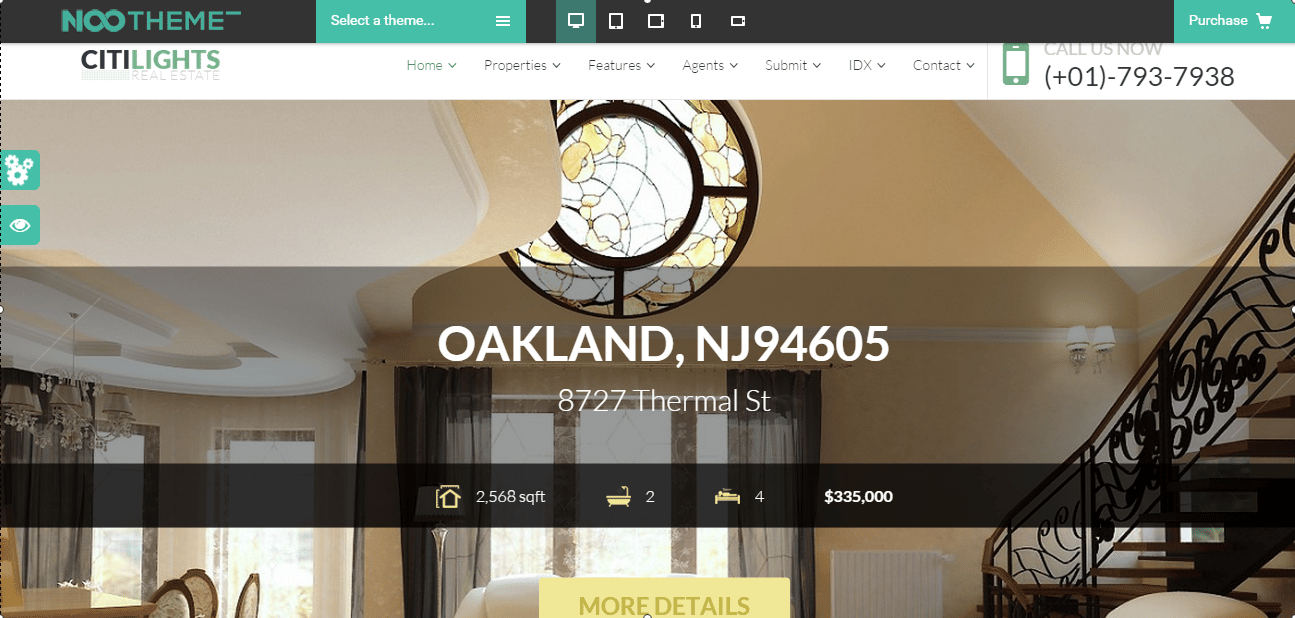
What if your website could generate high-value leads every single day, without you actively selling? The Real estate market is now rapidly growing as it recovers from the 2008 crisis, both in the US and Europe. It has never been easier for Real estate agents to have high-converting websites for their listings. You can choose from several different Real estate WordPress themes on Themeforest and install the theme in seconds. Once you have the website ready, you can choose from a number of different affiliate programs to start displaying the listings in no time. If you are a licensed Real estate agent and have your own listings, you can use the ClickSolid IDX plugin.
How This Business Works
A real estate website acts as a lead-generation platform.
Here is how it typically works:
- Visitors search for properties on your website
- They view listings and details
- They submit inquiries or contact forms
- You earn through commissions, referrals, or ads
You can run this business as:
- A real estate agent
- A listing aggregator
- An affiliate marketer
Step 1: Install a Real Estate Theme
Choose a theme designed specifically for property listings.
These themes usually include:
- Property search filters
- Listing layouts
- Agent profiles
- Map integration
Step 2: Add a Property Listing Plugin
A listing plugin allows you to:
- Add property details
- Upload images
- Set pricing
- Organize listings
This becomes the core of your website.
Step 3: Integrate Lead Capture Forms
To turn visitors into leads, you need forms.
Add forms to:
- Property pages
- Contact sections
- Popups
This allows users to:
- Request details
- Schedule visits
- Ask questions
Step 4: Add Location-Based Pages
Create pages targeting specific locations.
For example:
- Homes in a specific city
- Apartments in a specific area
This helps your site rank in search engines and attract organic traffic.
Step 5: Optimize User Experience
Make it easy for users to:
- Search properties
- Filter results
- View images
- Contact agents
A smooth experience increases conversions.
Revenue Opportunities
You can monetize your website in multiple ways:
- Commission per sale
- Paid property listings
- Featured listing fees
- Affiliate partnerships
- Display ads
What Makes This Idea Profitable
- High-value leads
- Recurring traffic potential
- Strong SEO opportunities
- Multiple income streams
Common Mistakes to Avoid
- Poor-quality property images
- Slow website speed
- No clear call-to-action
- Not capturing leads effectively
Quick Success Checklist
- Choose a niche location
- Add 20–50 property listings
- Set up lead capture forms
- Optimize for local SEO
- Promote through social media and ads
3- Traveling

What if your love for travel could turn into a consistent income stream, without owning a hotel or running a travel agency? Traveling is now a trillion-dollar industry. In 2015, people who are traveling don’t call travel agents; they look for deals online, compare prices, and book their hotels or hostels online too. With WordPress, it is pretty easy to set up your Travel blog or a vacation rental website. You can look for some WordPress themes, and you will notice that these themes come with some of the most amazing built-in features, such as search functionality, modules to add hotel listings from the back-end, ratings and review features, and much more.
How This Business Works
A travel website typically earns through content and partnerships.
Here is how it works:
- You create travel-related content (guides, reviews, tips)
- Visitors land on your site through search engines or social media
- They click on hotel, flight, or activity links
- You earn a commission when they book
Alternatively, you can:
- Accept direct bookings
- Rent out properties
- Sell travel packages
Step 1: Choose a Travel-Focused Theme
Start with a theme designed for travel websites.
Look for features like:
- Destination pages
- Search and filter options
- Review and rating systems
- Booking layouts
Step 2: Create High-Quality Content
Content is the backbone of your travel business.
Focus on articles like:
- “Best places to visit in [City]”
- “Top budget hotels in [Location]”
- “Complete travel guide for beginners”
These types of posts attract consistent organic traffic.
Step 3: Add Affiliate Programs
Sign up for travel affiliate platforms.
These allow you to earn commissions when users book:
- Hotels
- Flights
- Activities
You simply insert affiliate links into your content.
Step 4: Add Booking Functionality (Optional)
If you want to go beyond blogging, you can add booking features.
This allows users to:
- Book hotels
- Reserve properties
- Schedule trips
All directly from your website.
Step 5: Optimize for SEO
Travel is highly competitive, so SEO is critical.
Focus on:
- Long-tail keywords
- Location-based searches
- Informational content
This helps you rank faster and attract targeted visitors.
Revenue Opportunities
- Affiliate commissions
- Display ads
- Sponsored content
- Direct bookings
What Makes This Idea Powerful
- Passive income potential
- Scalable content model
- Global audience reach
- Multiple monetization channels
Common Mistakes to Avoid
- Writing generic content with no value
- Ignoring SEO
- Overloading pages with ads
- Not targeting a niche audience
Quick Success Checklist
- Choose a niche (budget travel, luxury, solo travel, etc.)
- Publish 20–30 SEO-focused articles
- Add affiliate links naturally
- Optimize for mobile users
- Promote on social media
4- Online Courses

What if you could package your knowledge once and sell it over and over again, without any physical product? E-learning is becoming very popular and especially with the introduction of certified courses like OSHA, Meditec, and many others. There are tons of affiliate programs in this niche, but the best one so far is this one. They offer certifications in different areas, starting from bartending to software engineering. Check out Clever Course and Academy to see how easy it is to set up your WordPress-based online learning website.
How This Business Works
An online course website allows you to:
- Create structured learning content
- Sell access to students
- Deliver lessons digitally
Here is the process:
- A user purchases your course
- They get access to lessons, videos, and materials
- You earn revenue from each enrollment
You can also offer:
- Subscriptions
- Certifications
- Memberships
Step 1: Install an LMS Plugin
An LMS (Learning Management System) is the core of your course website.
It allows you to:
- Create courses
- Manage students
- Track progress
Step 2: Build Your Course Content
Your course should include:
- Video lessons
- Quizzes
- Assignments
- Downloadable resources
Structure your content in a way that is easy to follow and engaging.
Step 3: Set Up Payments
You need a way to accept payments.
Common options:
- One-time course purchase
- Subscription-based access
Integrate secure payment gateways to handle transactions.
Step 4: Protect Your Content
Ensure that only paying users can access your course.
This is done through:
- User roles
- Access restrictions
- Membership controls
Step 5: Launch and Promote
Marketing is key to success.
Use:
- Email marketing
- Social media
- Affiliate programs
- SEO content
Revenue Opportunities
- Course sales
- Membership subscriptions
- Certifications
- Upsells and bundles
What Makes This Idea Profitable
- High profit margins
- No inventory or shipping
- Scalable business model
- Recurring revenue potential
Common Mistakes to Avoid
- Creating low-quality content
- Overloading courses with information
- Ignoring user experience
- Not validating demand before launch
Quick Success Checklist
- Choose a specific topic
- Create a structured course outline
- Record high-quality content
- Set up pricing and payments
- Launch with a marketing strategy
Final Thoughts
WordPress has completely changed how businesses are built online.
What once required developers, large budgets, and months of work can now be done in days, or even hours. Whether you choose eCommerce, real estate, travel, or eLearning, the opportunity is massive.
But success does not come from just launching a website.
It comes from:
- Choosing the right idea
- Following a structured setup
- Focusing on a niche
- Consistently improving your platform
Start simple. Take action. Then scale.
That is how real online businesses are built.
Ready to Turn Your WordPress Business Ideas Into Profits?
Most people get stuck after installing WordPress. They struggle with plugins, integrations, performance issues, and scaling their idea into a real business.
That is where WooNinjas comes in.
Build Smarter. Launch Faster. Scale Better With WooNinjas
At WooNinjas, we do more than just build websites. We create powerful WordPress business ideas solutions designed to generate real revenue.
Whether you want to launch:
- An eCommerce store
- A real estate platform
- A travel booking website
- An online course business
Our team helps you:
- Set up the right tools and integrations
- Optimize performance and user experience
- Build scalable, conversion-focused platforms
- Turn your idea into a fully functional business
Stop struggling with setup and start focusing on growth.
Get in touch with WooNinjas today and turn your WordPress business ideas into a profitable online business.
FAQs
1. How long does it take to launch a WordPress business website?
You can launch a basic WordPress business website within a few hours if you use pre-built themes and plugins. However, optimizing design, content, and performance for real results may take a few days.
2. Do I need technical skills to start a WordPress-based business?
No, most WordPress business ideas can be set up without coding. Tools like drag-and-drop builders, plugins, and themes make it beginner-friendly. That said, expert help can speed things up and avoid costly mistakes.
3. Which WordPress business idea is the most profitable?
It depends on your goals. Online courses and eCommerce stores often offer high profit margins, while real estate and travel sites can generate consistent long-term revenue through leads and affiliate income.
4. What are the biggest mistakes to avoid when starting a WordPress business?
Common mistakes include choosing the wrong niche, using too many plugins, ignoring SEO, having a slow website, and not focusing on user experience or conversions. Keeping things simple and strategic is key.


