How to Use ChatGPT for SEO: Keyword Research, Content, and Optimization
SEO involves many tasks, from finding keywords to writing content and improving pages. ChatGPT can help you finish these tasks faster and more efficiently. In...

SEO involves many tasks, from finding keywords to writing content and improving pages. ChatGPT can help you finish these tasks faster and more efficiently.
In 2025, Ahrefs found that 87% of marketers used AI to help create content, while 44% specifically used ChatGPT. But most people don’t know how to use it efficiently for your SEO tasks to improve your search rankings. These tools are already part of many content workflows, but using ChatGPT doesn’t automatically make a page rank higher on Google.
There is also a difference between using ChatGPT to improve your website SEO and getting your website cited in answers from ChatGPT, Gemini, Claude, or Perplexity. We’ll look at both goals, test the relevant workflows, and use the results to separate good practices from advice that doesn’t hold up.
Quick Answer
ChatGPT for SEO helps generate keyword ideas, plan and edit content, write meta tags, suggest internal links, optimize WooCommerce product pages, and review technical SEO elements. Validate keyword data with Ahrefs or Semrush and verify facts before publishing. ChatGPT does not guarantee higher rankings or AI search citations.
What Can You Do With ChatGPT for SEO?
ChatGPT can help with several SEO tasks, from finding keyword ideas to improving website content. Instead of handling every task manually, you can use it to prepare a starting point and then review the results before publishing.
Here are some ways to use ChatGPT for SEO:
- Keyword research: Generate keyword ideas and group them by topic or search intent.
- Content planning: Create blog outlines, headings, and content briefs.
- Content writing and editing: Draft sections, simplify sentences, and remove repetition.
- On-page SEO: Prepare title tags, meta descriptions, FAQs, and image alt text.
- Technical SEO: Get help reviewing regex patterns, redirect rules, and code snippets.
- WooCommerce SEO: Draft product descriptions and improve category page content.
- AI Search Visibility: Review your content and explore ways to improve how ChatGPT and other AI search tools cite it.
The key is to treat ChatGPT’s output as a starting point, not a finished result. In the following sections, we’ll test these workflows individually and see which outputs are useful, what needs editing, and what requires further verification.
ChatGPT for SEO Content Starts With Clear Briefs and Editing
Create an SEO Content Outline
Start with the target keyword, audience, and search intent. Ask ChatGPT to organize the main topics before you begin writing. Review the suggested structure and identify any missing topics before drafting.
Prompt to use:
Act as an SEO content assistant. Create a practical blog outline using the details below.

Topic: How to Use ChatGPT for SEO
Primary keyword: ChatGPT for SEO
Target audience: Beginners, SEO professionals, and WordPress or WooCommerce website owners
Search intent: Informational. Readers want practical ways to use ChatGPT for SEO tasks.

Include:

A clear H1.

Relevant H2s and H3s in a logical order.

The main question each section should answer.

Important subtopics that the article may be missing.

Sections that overlap or repeat the same information.

Keep the outline focused on the topic. Do not write the full article or invent search volume, keyword difficulty, or ranking data.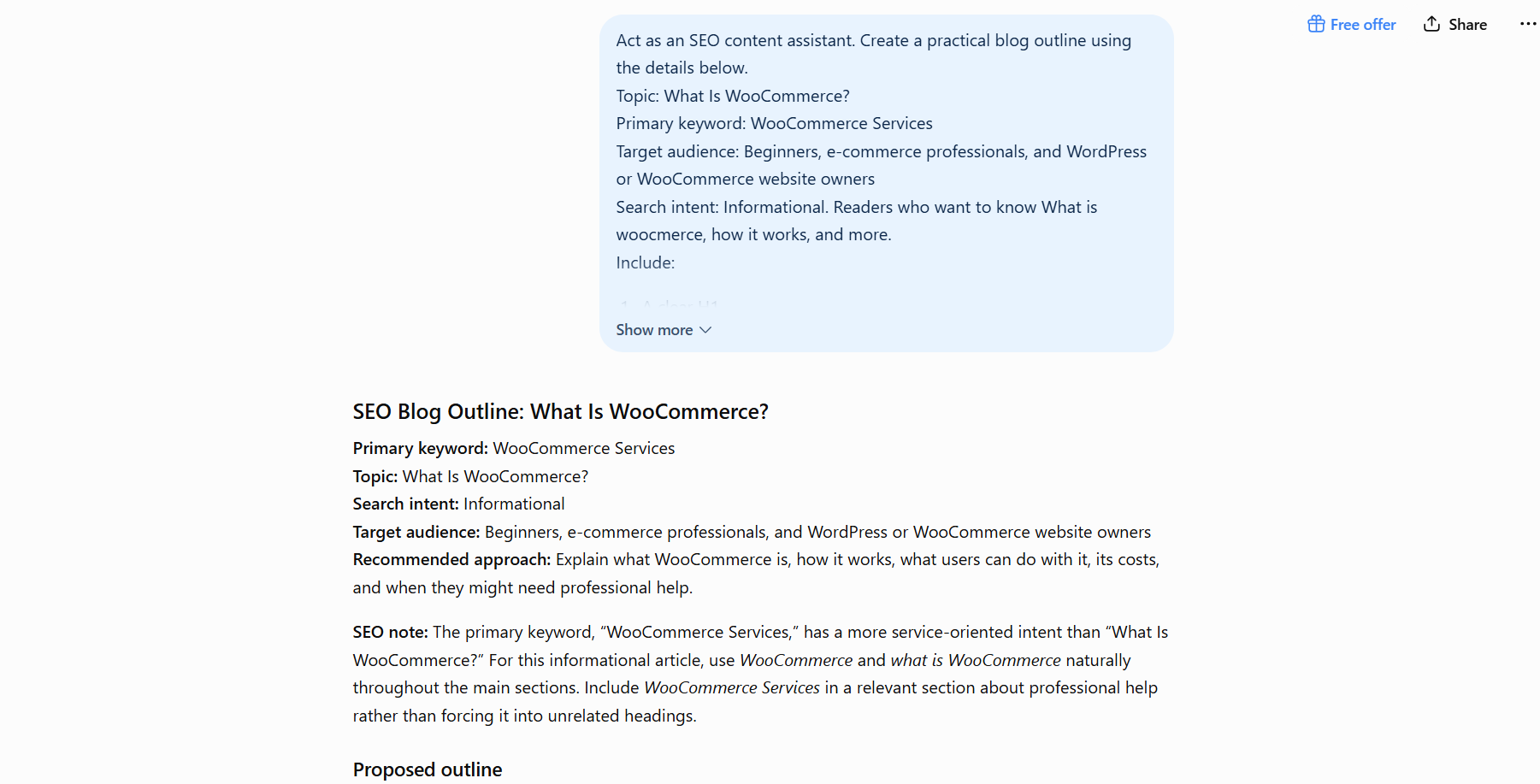
Improve Readability and Check Search Intent
After drafting your content, ask ChatGPT to review its readability, grammar, and relevance to the target search intent. It can suggest clearer wording and flag gaps for you to review. Verify its suggestions before changing the article.
Prompt to use:
Act as an SEO content editor. Review the draft below for readability, grammar, and search intent.
Primary keyword: ChatGPT for SEO
Target audience: Beginners, SEO professionals, and WordPress or WooCommerce website owners
Search intent: Readers want practical advice on using ChatGPT for SEO tasks.
Tasks:
Correct grammar and awkward phrasing.
Simplify sentences that are difficult to understand.
Check whether the draft answers the reader’s likely questions about the topic.
Identify important gaps, irrelevant sections, and repeated points.
Revise the draft while preserving its original meaning, facts, and examples.
Do not add unsupported claims, invent statistics, or force the primary keyword into the text. List the main content gaps separately from the revised draft.
Draft:[Paste your content here]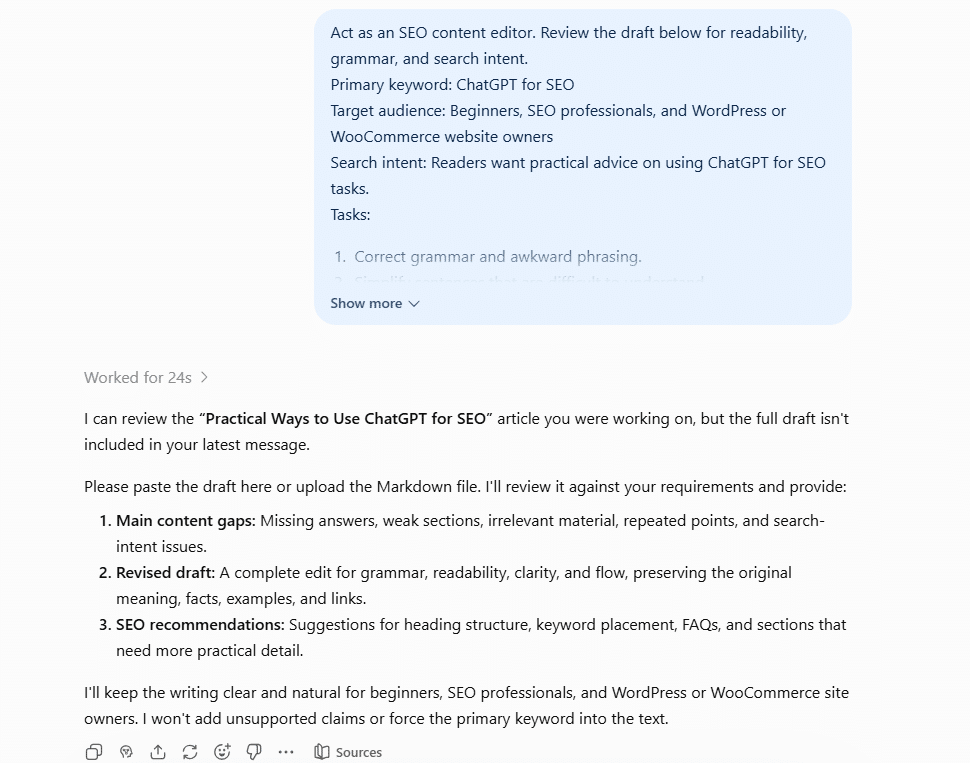
ChatGPT for SEO Keyword Research Gives You Ideas to Validate
Connecting ChatGPT with Ahrefs or Semrush lets you combine keyword brainstorming with SEO data. You can use ChatGPT to generate keyword ideas, group them by search intent, and review relevant keyword metrics from your SEO tool before choosing which terms to target.
Find and Validate Keywords With ChatGPT and Ahrefs or Semrush
Use this workflow to generate keyword ideas and assess their relevance with SEO data. The goal is to identify useful keywords for your topic, not to collect a long list of unrelated suggestions.
Prompt to use:
Act as an SEO keyword research assistant. Use the available Ahrefs or Semrush data to research the topic below.
Main topic: ChatGPT for SEO
Target audience: SEO beginners, content writers, and WordPress or WooCommerce website owners.
Generate relevant keyword ideas related to the main topic.
Group them by search intent, including informational queries, content optimization, keyword research, WooCommerce SEO, and common questions.
Review the available SEO data for search volume, keyword difficulty, and related keyword opportunities.
Identify keywords that are relevant to the audience and suitable for the article.
Remove irrelevant or repetitive suggestions.
Present the results in a table with these columns: Keyword, Search Intent, Search Volume, Keyword Difficulty, and Recommendation.
Use only metrics available in the connected SEO tool. Do not invent missing data or assume that a keyword will rank easily. 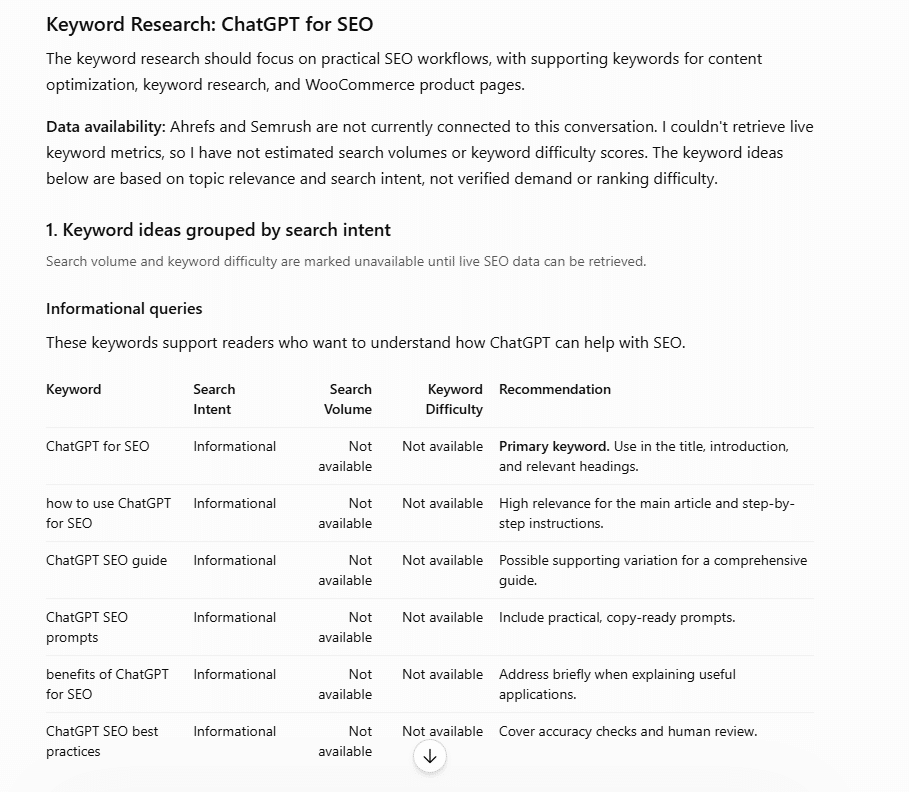
ChatGPT SEO Prompts for Titles, Meta Descriptions, and Internal Links
ChatGPT can help draft title tags, meta descriptions, and relevant internal link suggestions. Use it to prepare options for review, then check that each suggestion accurately reflects the page and fits your SEO strategy.
Generate and Review On-Page SEO Elements
Use ChatGPT to draft a title tag and meta description for a specific page. Provide the target keyword, page content, and search intent so the suggestions stay relevant to the page.
Prompt to Use:
Act as an SEO editor. Review the page details below and suggest an SEO title tag and meta description.
Page topic: [Enter the page topic]
Primary keyword: [Enter the target keyword]
Search intent: [Enter the intended search intent]
Page content: [Paste the page content]

Provide:
Three title tag options.
Two meta description options.
A brief explanation of how each option reflects the page content and target keyword.
Keep the wording natural and accurate. Avoid keyword stuffing, clickbait, and claims that the page does not support. Do not promise improved rankings. Check character lengths and report them for each option. 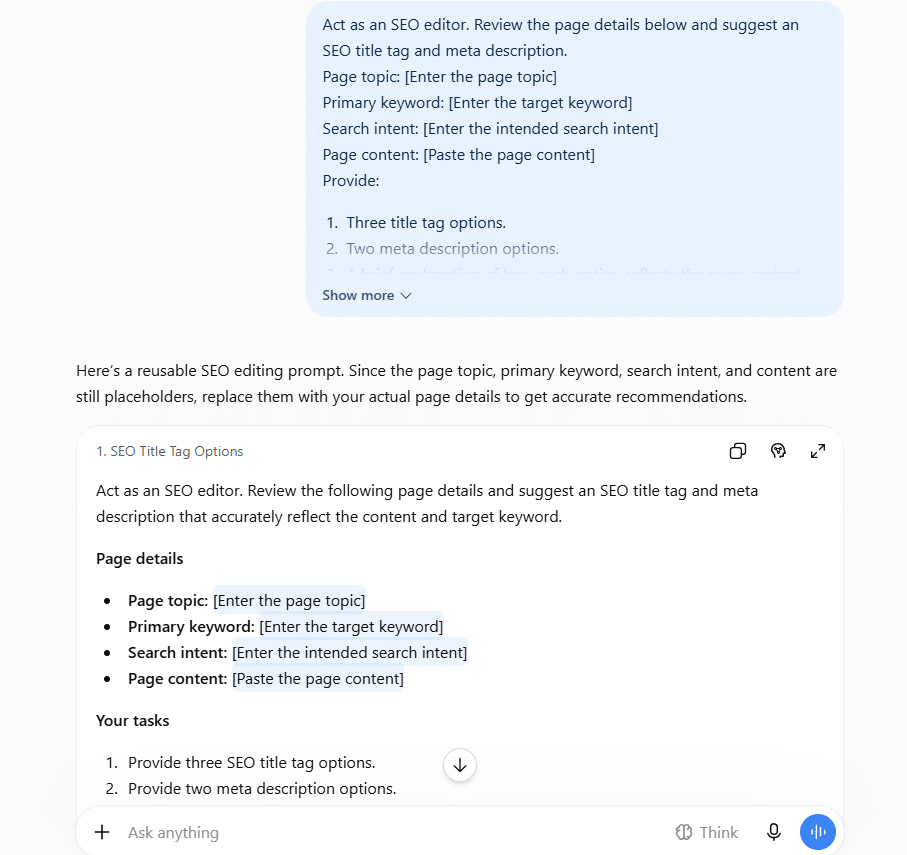
ChatGPT E-commerce SEO for WooCommerce Product Pages
ChatGPT can help improve WooCommerce product descriptions by making them clearer, organizing product details, and aligning the copy with customer search intent. Use the actual product information as your source so the revised content stays accurate.
Optimize a WooCommerce Product Description With ChatGPT
Provide ChatGPT with the existing product description, product specifications, and target keyword. Ask it to improve the wording while preserving important product details and avoiding unsupported claims.
Prompt to use:
Act as an SEO content editor for WooCommerce. Improve the product description below for clarity, readability, and search relevance.
Product name: [Enter the product name]
Primary keyword: [Enter the target keyword]
Target audience: [Describe the intended customers]
Product features and specifications: [Paste verified product details]
Existing product description: [Paste the current description]
Please:
Rewrite the description in clear, natural language.
Explain the product's main features and practical benefits using only the supplied information.
Include the primary keyword naturally where relevant.
Remove repetition, vague claims, and unnecessary wording.
Suggest a concise product meta description.
Do not invent specifications, compatibility details, guarantees, or product benefits. Preserve all important facts and flag missing information instead of guessing. 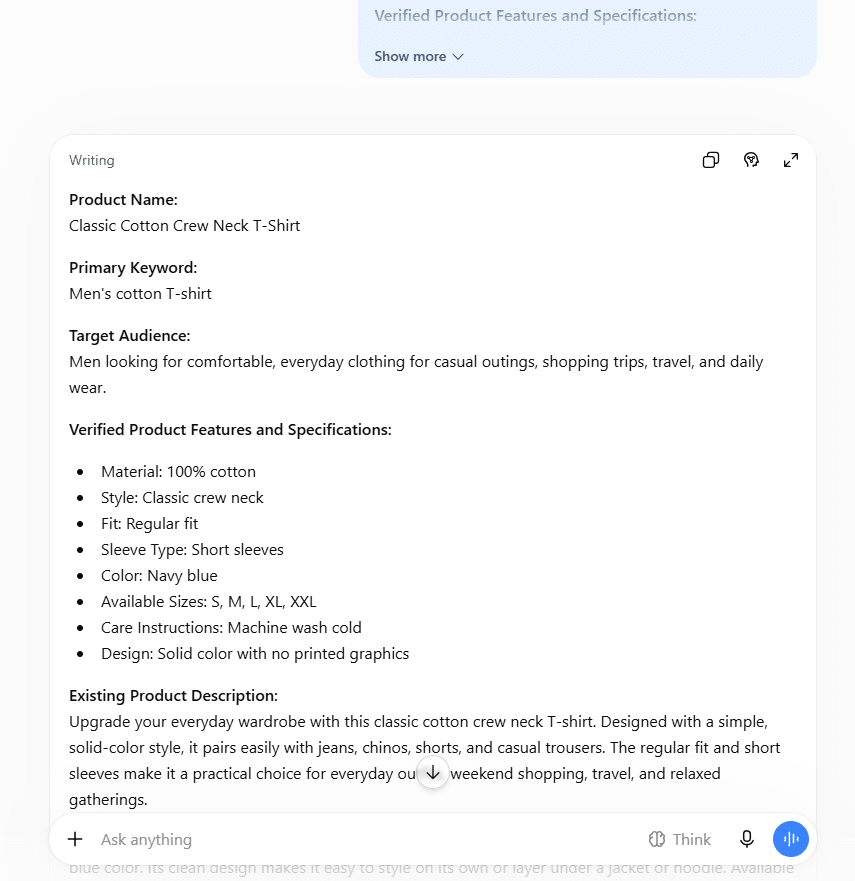
ChatGPT and Google SEO Must Focus on Helpful, Original Content
Google does not prohibit content simply because a website uses generative AI. Its guidance focuses on content quality and whether pages provide real value to readers. Producing many pages with little original value to manipulate search rankings can violate Google’s scaled content abuse policy.
Audit Content for Accuracy and Original Value
Use ChatGPT to review a draft for unsupported claims, repetition, missing information, and content that adds little beyond existing sources. Treat its feedback as an initial review, not proof that the article meets Google’s guidelines.
Prompt to use:
Act as an SEO content reviewer. Audit the following draft for accuracy, usefulness, and originality.
Target topic: [Enter the topic]
Target audience: [Describe the audience]
Draft: [Paste your article]
Review the draft for:
Unsupported claims, statistics, or statements that need reliable sources.
Repeated points or sections that provide little additional value.
Important questions the article does not answer.
Generic information that could benefit from original examples, evidence, or practical insights.
Claims that do not match the supplied sources.
Present your findings in a table with these columns: Issue, Exact Passage, Why It Needs Review, and Suggested Improvement.
Do not invent facts, sources, or statistics. Do not claim that the article complies with Google's policies. Flag anything that requires human verification. 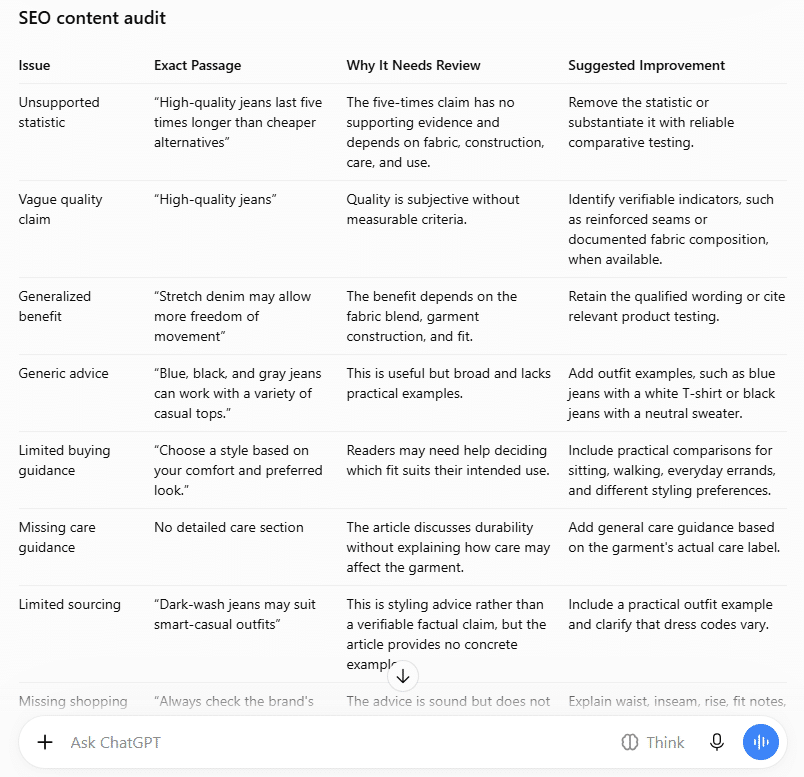
SEO for ChatGPT Focuses on Useful, Accessible Content
Your website needs useful content that search systems can access. OpenAI uses OAI-SearchBot to discover websites for ChatGPT search results. Allowing this crawler to access your pages can help your content appear in search results, but it does not guarantee visibility or citations. See OpenAI’s crawler documentation for details.
Review Your Robots.txt for ChatGPT Search Access
Use ChatGPT to review your website’s robots.txt file and identify rules that may prevent OAI-SearchBot from accessing important pages. This provides a starting point for checking whether your site allows the crawler to access your content.
Prompt to use:
Act as a technical SEO reviewer. Review the robots.txt file below to identify any rules that may block OAI-SearchBot from accessing my website's important pages.
Website URL: [Enter your website URL]
Important page paths: [List the pages or directories you want reviewed]
Robots.txt content: [Paste your current robots.txt file]
Please:
Identify rules that disallow OAI-SearchBot from crawling the listed paths.
Explain which directives may affect access to important pages.
Flag conflicting or unclear rules that need further review.
Suggest changes only where the supplied file supports them.
Explain what I should verify before applying any changes.
Do not assume that robots.txt alone confirms website accessibility. Distinguish crawler permission from actual crawl success, search visibility, and citations. Do not guarantee that the website will appear in ChatGPT Search. 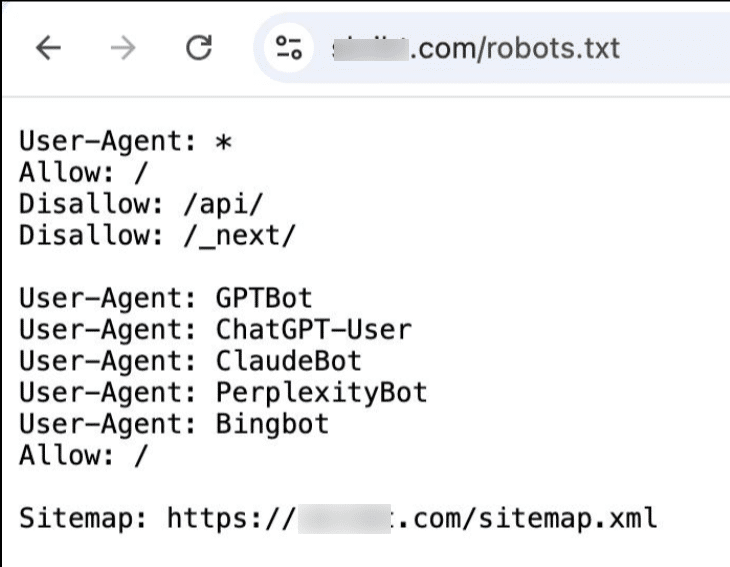
ChatGPT for SEO Competitor Analysis Helps Find Content Gaps
A competitor’s page may cover useful subtopics, questions, or examples that your page misses. ChatGPT can compare competitor content with your existing article and identify gaps worth reviewing. The goal is to improve coverage, not simply make your article longer.
Compare Competitor Pages With Your Content
Provide the content of three to five competing pages and your article. Ask ChatGPT to compare their topics and identify relevant gaps.
Prompt to use:
Act as an SEO content analyst. Compare the competitor pages below with my existing page and identify relevant content gaps.
Target keyword: [Enter your target keyword]
My page URL and content: [Paste your URL and page content]
Competitor pages: [Paste the URLs and available page content, labeling each competitor]
Please:
List the main topics and subtopics covered by each competitor.
Compare their coverage with my page.
Identify relevant questions, examples, use cases, or details my page misses.
Separate important gaps from topics that are not relevant to my audience.
Recommend specific sections or edits that could improve my page.
Present the findings in a table with these columns: Topic, Competitor Coverage, My Page Coverage, Identified Gap, and Recommended Action.
Use only the supplied content. Do not invent competitor details, search rankings, or search volume. Do not recommend adding content just to increase word count. 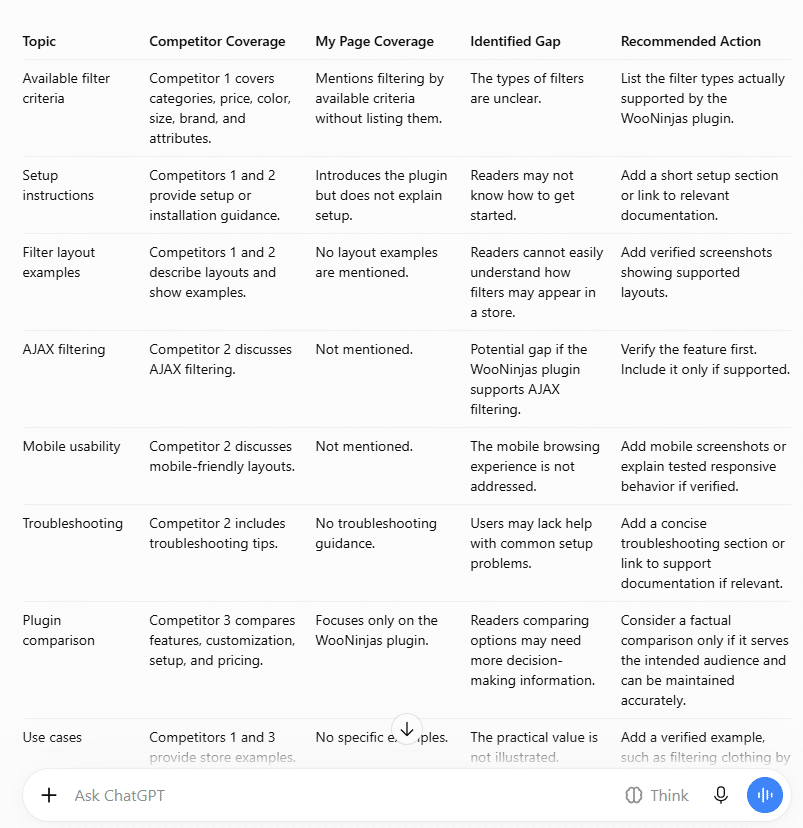
Use ChatGPT for SEO Internal Linking Based on Context
Internal links help readers move between related pages on your website. ChatGPT can suggest relevant links by comparing your article with your existing URLs and page content. The key is to match the link to the context, not just a shared keyword.
Find Relevant Internal Links for Your Content
Provide your published URL list and the draft you want to improve. Ask ChatGPT to recommend links with exact anchor text and placement.
Prompt to use:
Act as a WordPress SEO editor. Suggest relevant internal links for the draft below using my existing page list.
Draft content: [Paste your article]
Published URL list: [Paste URLs with their page titles and, where available, relevant content]
For each recommendation:
Quote the exact sentence where the link should be added.
Suggest a natural, descriptive anchor text.
Provide the matching destination URL from my list.
Explain briefly how the destination supports the sentence.
Flag links that seem irrelevant or repeat an existing link unnecessarily.
Return the suggestions in a table with these columns: Source Sentence, Anchor Text, Destination URL, and Reason for Linking.
Use only the supplied URLs. Do not invent pages, alter URLs, or recommend links based only on keyword similarity. Do not rewrite the entire article. 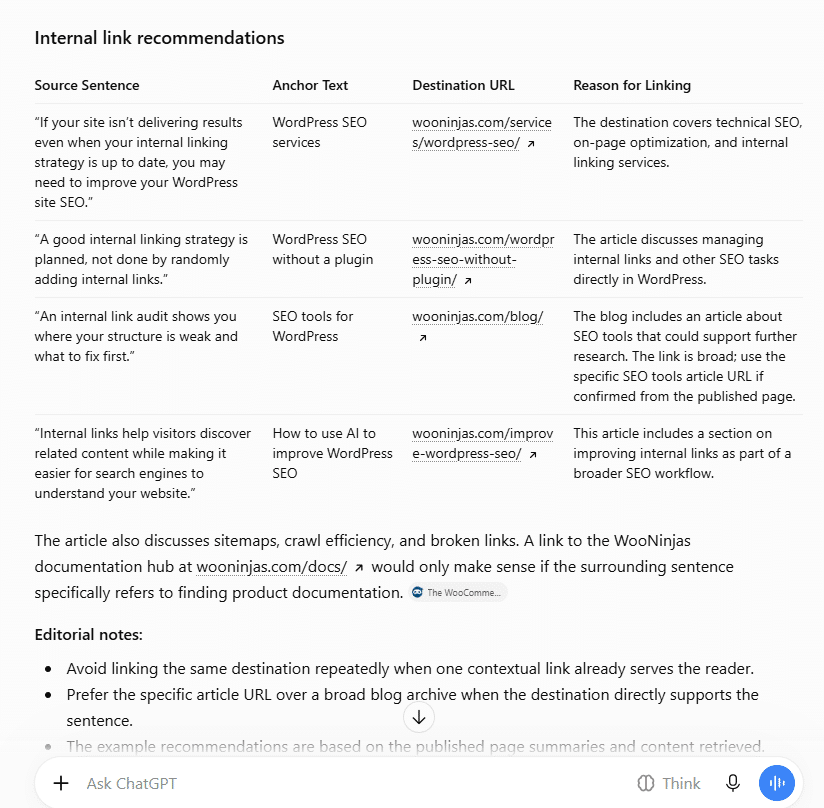
ChatGPT Search Optimization Starts With Clear Answers
Readers often search for direct answers to specific questions. Clear, self-contained answers can make your content easier to understand and may help search systems identify relevant information. However, answer blocks do not guarantee inclusion in Google AI Overviews or citations in ChatGPT Search.
Looking for a Ready-Made Solution?
Explore our WordPress, WooCommerce, and LMS plugins built to extend functionality without custom development.
Write Direct Answers to Search Questions
Use questions from Google Search Console, Google’s People Also Ask results, or customer support queries. Ask ChatGPT to write a concise answer that makes sense on its own.
Prompt to use:
Act as an SEO content editor. Write a clear, self-contained answer to the question below using the supplied source material.
Target keyword: [Enter your target keyword]
Question: [Enter a question your audience asks]
Source material: [Paste relevant, verified information]
Please:
Write a direct answer of 40 to 60 words.
Answer the question in the first sentence.
Include the necessary context so the answer makes sense on its own.
Use simple, precise language.
Avoid unsupported claims, unnecessary introductions, and references such as "as mentioned above."
Identify any missing information that prevents you from giving a complete answer.
Do not invent facts or claim that the answer will appear in AI search results. 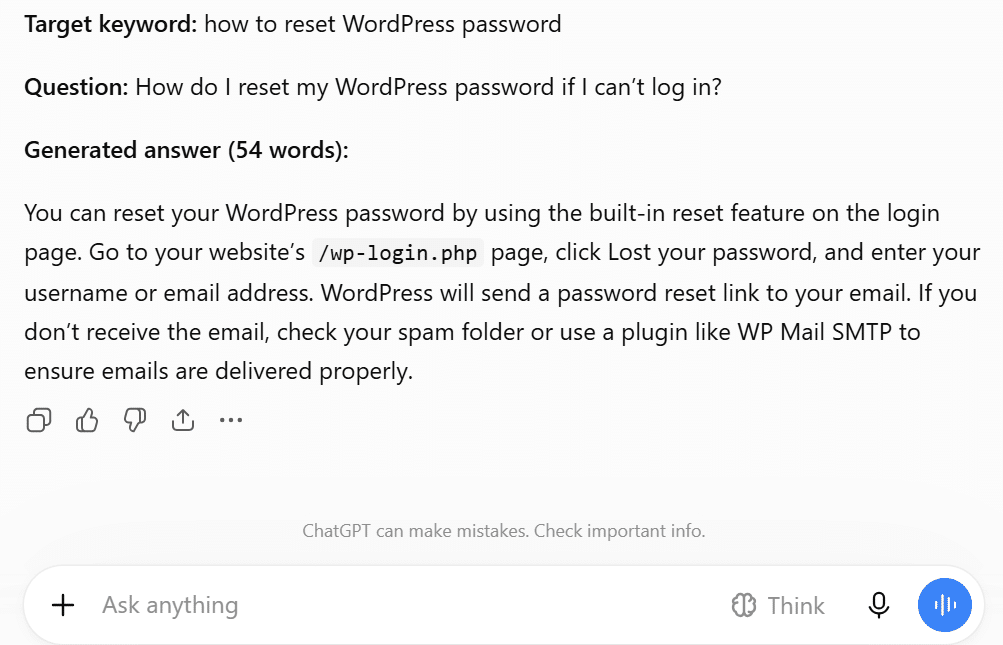
Use ChatGPT to Review Schema Markup for SEO
Schema markup describes page content in a structured format that search engines can interpret. WordPress themes and plugins may output overlapping schema, so review your existing markup before adding more. ChatGPT can help inspect the code, but you must validate the result before publishing it.
Review Existing Schema and Check for Conflicts
Provide the page content and schema code currently generated by your WordPress plugins or theme. Ask ChatGPT to identify duplicate entities, conflicting properties, and values that need verification.
Prompt to use:
Act as a technical SEO reviewer. Review the existing schema markup for my WordPress page.
Page URL: [Enter the page URL]
Page type: [Article, Product, FAQ, or another relevant type]
Page content: [Paste the relevant page content]
Existing schema markup: [Paste the schema from the page source]
Please:
Identify duplicate schema blocks or potentially conflicting entity details.
Check whether the markup matches the actual page content.
Flag missing, invalid, or unsupported properties.
Identify values that cannot be verified from the supplied information.
Recommend specific corrections without inventing values.
Explain what I should validate before publishing any changes.
Present the findings in a table with these columns: Issue, Affected Property, Evidence, and Recommended Action.
Do not assume that all schema should be combined into one block. Preserve valid existing markup unless there is a clear reason to change it. Do not claim that the page qualifies for a rich result without validation. 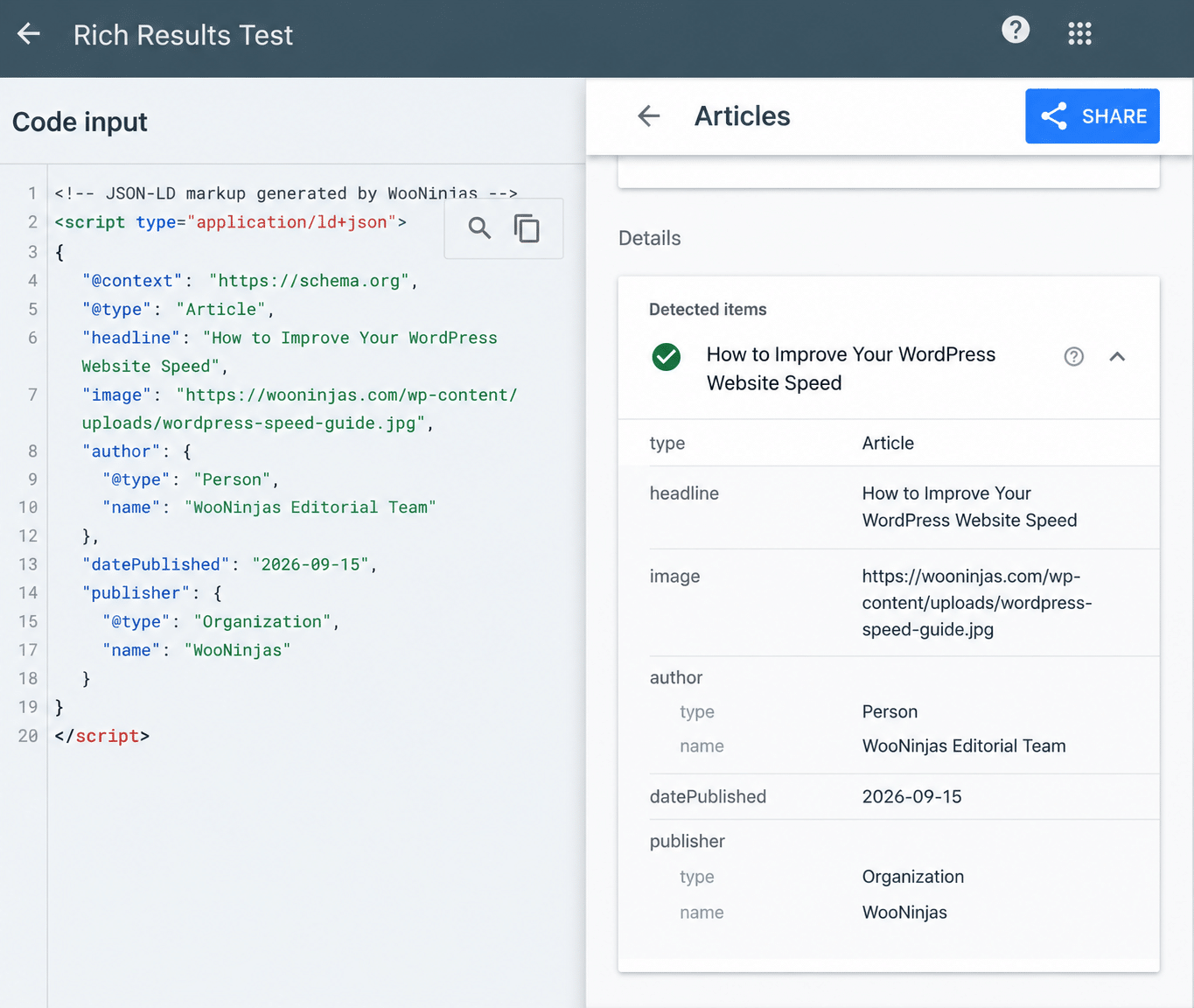
How to Improve Your Chances of Being Cited by ChatGPT, Gemini, Claude, and Perplexity
Make your content easy to access, understand, and verify. No method guarantees citations, so focus on useful content and standard SEO practices.
Give Direct Answers
Answer the question in the first one or two sentences under each relevant heading, then add supporting details or examples.
Publish Original Data and Examples
Include your own research, test results, screenshots, or real examples. Support factual claims with reliable sources, and never invent statistics.
Keep Your Website Accessible
Check that robots.txt, your firewall, and CDN settings do not block relevant crawlers. Maintain an accurate XML sitemap and monitor indexing in Google Search Console.
Use Clear Headings and Lists
Organize content with descriptive headings, short paragraphs, and lists where useful. Make each section answer a specific question.
Add Relevant Schema Markup
Use appropriate structured data, such as Article or Product schema, and ensure it matches the visible page content. Validate it before publishing.
Support Claims With Reliable Sources
Link statistics, technical advice, and factual claims to credible sources, preferably original research or official documentation.
Update Content and Add Internal Links
Keep important information current and link to related pages using descriptive anchor text that fits the context.
Bonus tip: Add an llms.txt File
You can add an llms.txt file to summarize your website’s content for systems that choose to use it. However, Google says this file does not improve or harm your Google Search visibility, so prioritize standard SEO practices first.
ChatGPT SEO Mistakes to Avoid
ChatGPT can support SEO tasks, but its suggestions need review before you use them. Avoid these common mistakes to keep your content accurate, useful, and relevant to search intent.
Publishing Content Without Fact-Checking
Verify statistics, product details, technical advice, and external claims against reliable sources before publishing.
Stuffing Keywords Into Content
Use your primary and related keywords naturally. Repeating keywords unnecessarily makes content harder to read and flagged as spam.
Publishing Generic or Repetitive Content
Review AI-generated drafts for repeated points and vague advice. Add specific examples, original insights, and information that answers readers’ questions.
Trusting Unverified SEO Data
ChatGPT may suggest keywords, search volumes, or ranking opportunities without reliable data. Check keyword metrics in tools such as Ahrefs or Semrush before making decisions.
Ignoring Search Intent
Make sure the page answers what users are looking for. A well-written article will not meet the need if it misses the main question.
Copying Competitor Content
Use competitor pages to identify missing topics, not to reproduce their wording. Create content that reflects your research, examples, and expertise.
Using Schema or Technical Code Without Testing
Review generated schema, redirect rules, and other code before applying changes. Validate the output with the relevant testing tools and check it in a safe environment first.
Key Takeaway
- Give ChatGPT your target keyword, audience, and search intent to create a focused blog outline.
- Use ChatGPT to fix grammar, remove repetition, and find missing information in your draft.
- Compare your article with competitor pages to identify relevant topics and unanswered questions.
- Review and test ChatGPT’s suggestions for schema markup, redirects, and robots.txt before applying changes.
Conclusion
ChatGPT can also help with SEO tasks such as generating keyword ideas, outlining and editing content, writing meta descriptions, suggesting internal links, reviewing competitor content, and checking technical SEO issues. Use tools like Ahrefs or Semrush to check keyword metrics and test technical changes before applying them to your website.
AI search visibility means checking whether your website appears as a cited or linked source in answers from platforms such as ChatGPT Search, Google AI Overviews, Gemini, Claude, and Perplexity. These results vary, and no SEO method guarantees citations. Focus on useful content, accurate information, and established SEO practices.
Our WordPress SEO services help improve your website’s search rankings. Contact our team to discuss your SEO goals and how we can support your website.
FAQs
Can ChatGPT Help With SEO?
Yes. ChatGPT can suggest keywords, create content outlines, edit drafts, write meta descriptions, suggest internal links, and review technical SEO issues. Check its suggestions before using them.
Can ChatGPT Do Keyword Research?
ChatGPT can suggest keywords and group them by search intent. Use Ahrefs or Semrush to check search volume, keyword difficulty, and related keywords.
Does Google Penalize AI-Generated Content?
Google does not automatically penalize content because it was created with AI. Content that violates Google’s spam policies, including large amounts of low-value content created to manipulate rankings, can face penalties.
Can ChatGPT Write SEO-Friendly Content?
Yes. ChatGPT can draft and edit content, but you should check facts, match the content to search intent, and add relevant examples before publishing.
Can ChatGPT Improve Google Rankings?
ChatGPT cannot guarantee higher rankings. It can help with content and SEO tasks, but results depend on factors such as relevance, content quality, and technical SEO.
Can ChatGPT Provide Search Volume and Keyword Difficulty?
ChatGPT may not have reliable data for these metrics. Use Ahrefs or Semrush to check search volume, keyword difficulty, and related keyword data.
How Can I Get My Website to Appear in ChatGPT Search?
Publish useful content and make sure OpenAI’s search crawler, OAI-SearchBot, can access your pages. This can help ChatGPT discover your content, but it does not guarantee citations.
Can I Use ChatGPT for WooCommerce SEO?
Yes. ChatGPT can help edit product descriptions, write meta descriptions, organize category page content, and suggest internal links. Check all product details before publishing.
Need Ongoing WordPress Maintenance & Support?
We handle updates, performance monitoring, security hardening, and technical fixes so your WordPress and WooCommerce site stays stable and secure.

Introducing Cannibalization Killer – Find, Fix Keyword Cannibalization Issues and Improve SEO Performance
Stop keyword cannibalization from holding your SEO back. Scan your WordPress site, find competing pages, and fix conflicts with Cannibalization…
Read More...
Updating PHP in WordPress: Step-by-Step Guide
Follow the steps to change your WordPress PHP version, test your website, and fix compatibility issues after an update.
Read More...
WordPress AI in 2026: What It Can Do and Where It Falls Short
WordPress AI can help with content, page creation, search, and automation. Compare builders, plugins, and custom integrations to find the…
Read More...
