LearnDash Redis Object Cache: The Complete Guide to Speeding Up Your LMS
Slow LearnDash site under student load? LearnDash Redis Object Cache fixes database bottlenecks that WP Rocket can't reach. See how to set it up the right way.

If your LearnDash site has more than a handful of students, it is probably slower than it should be. Not because LearnDash is poorly built, but because of how WordPress handles data by default.
Every time a student loads a lesson, checks their progress, or views a quiz result, WordPress queries the database. With ten students online at once, that is manageable. With a hundred, or during a course launch when several hundred people log in at the same time, those queries pile up fast, and the site starts to slow down or stall.
The LearnDash Redis Object Cache add-on solves this at the database layer, the part of the performance problem that standard caching plugins like WP Rocket or W3 Total Cache cannot reach. This guide explains what Redis object caching is, why generic Redis plugins fall short for LearnDash, how to set it up, and how it fits into your existing caching stack.
Why LearnDash Site Speed Is a Business Problem, Not Just a Technical One
Page speed has been a confirmed Google ranking factor since Core Web Vitals became part of the search algorithm. But for a course platform, the business impact is more direct. A slow lesson page is a friction point in the middle of a student’s learning session. They are mid-lesson, waiting for the next topic to load, and that pause is enough to break focus or push them to close the tab entirely.
Page abandonment at the three-second mark is well-documented across web performance research. For an LMS platform, that is not just a bounce rate statistic. It is a student who does not complete the lesson, does not finish the course, and may request a refund.
The performance problem gets worse for LMS sites specifically because of one factor: logged-in users. Standard static caching works well for pages that look the same for everyone, such as a homepage or a product page that a visitor sees before logging in. The moment someone logs in, and their experience becomes personalised, showing their progress, enrolled courses, and quiz scores, static page caching stops working entirely. Every page load has to go back to the database.
LearnDash sites are almost entirely built around logged-in users. That means most of the traffic on your site is bypassing static cache entirely and hitting the database directly on every request.
Everything You Need for Faster LearnDash and WooCommerce Performance
1. Put Your Website on a Speed Boost with Smart Caching

Why make your server work harder than it has to?
This add-on uses powerful object caching technologies like Redis, Memcached, and APCu to store frequently requested data and serve it instantly. The result? Faster page loads, smoother browsing, and a better experience for every visitor.
2. Say Goodbye to Excessive Database Queries

Every database query takes time. Thousands of them take even more.
By storing data in object cache, this add-on dramatically reduces the number of database requests running on each page. Less server work means faster response times and happier users.
3. Stay Fast Even When Traffic Explodes

A busy website is a good thing, unless it slows everything down.
Whether you’re running a large LearnDash LMS, a WooCommerce store, or both, this add-on helps your website stay responsive during traffic spikes. Your pages continue loading quickly, even when hundreds or thousands of users are active at the same time.
4. Refresh Your Cache with a Single Click

Need to clear outdated cached data?
No problem. The built-in cache management tools allow you to reset or renew the object cache with just one click. Keeping your website optimized has never been easier.
5. Built Specifically for LearnDash and WooCommerce

Generic caching solutions don’t always understand LMS and eCommerce data.
Looking for a Ready-Made Solution?
Explore our WordPress, WooCommerce, and LMS plugins built to extend functionality without custom development.
This add-on is designed specifically for websites running LearnDash LMS and WooCommerce together. It intelligently caches important objects that improve performance while excluding reports and data that should not be cached.
The result is a faster website without breaking critical functionality.
6. Choose Exactly What Gets Cached

Not every page should be cached.
With flexible exclusion settings, you can prevent specific pages, posts, or content from entering the cache. This gives you complete control over how your website delivers content while maintaining optimal performance.
How Redis Fits Into Your Full Caching Stack
Understanding where Redis sits in your performance setup clarifies what it does, what it does not do, and what you still need alongside it.
| Cache Type | What It Caches | Works For | Works With Redis? |
| Static page cache (WP Rocket, W3 Total Cache) | HTML, CSS, JS, images | Logged-out visitors only | Yes, they stack |
| Browser cache | Static assets in the visitor’s browser | Returning visitors | Yes |
| Object cache (Redis) | Database query results in memory | All users, including logged-in | Is the cache |
| OPcache | Compiled PHP code | All server requests | Yes |
Redis object caching and static page caching target different layers and different types of traffic. Adding Redis does not require removing or disabling your existing static cache. The two systems stack correctly and cover complementary parts of the traffic profile on a LearnDash site.
| Every logged-in student request hits your database. Redis fixes that. If your LearnDash site is slowing down under student load and standard caching plugins are not making a difference, object caching is almost certainly the missing layer. The LearnDash Redis Object Cache add-on is built specifically for LearnDash and WooCommerce, with report queries and completion tracking excluded from cache by default. No conflict with your existing caching setup. |
Setting Up LearnDash Redis Object Cache
Requirements
- A WordPress hosting environment that provides Redis, Memcached, or APCu. Most managed WordPress hosts include at least one of these. If you are not sure, check your host’s documentation or support chat.
- LearnDash is installed and active.
- The LearnDash Redis Object Cache add-on from WooNinjas is installed and activated.
Configuration Steps
- Install the add-on from your WooNinjas account downloads.
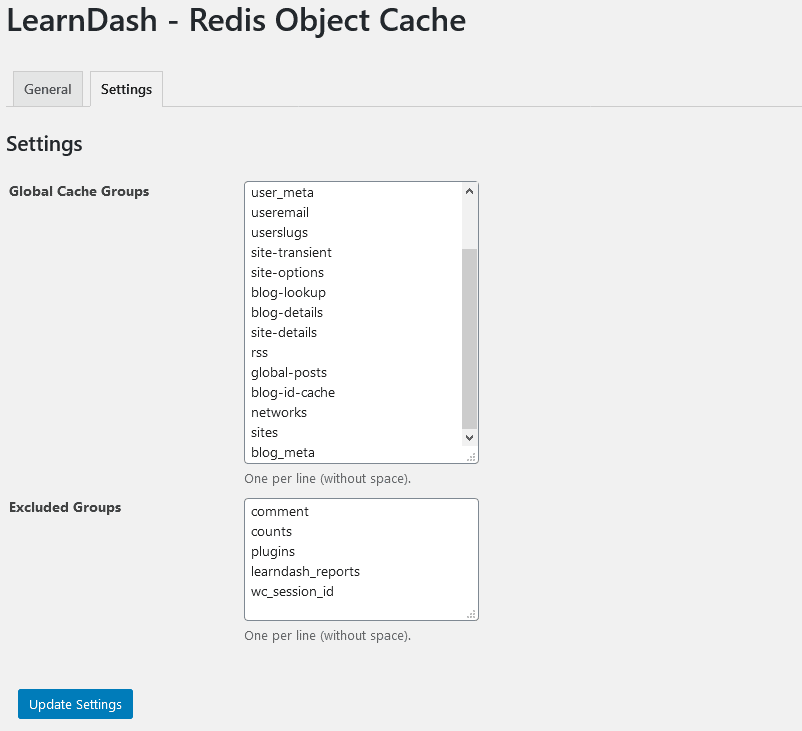
- Go to Settings in the WordPress admin and select Redis Object Cache from the menu.
- The add-on automatically detects your available backend: Redis, Memcached, or APCu. The detected backend is shown in the settings panel.
- Enable the cache using the toggle. The status indicator confirms whether the connection to the backend is active.
- Optionally configure the cache expiry time. The default settings work well for most LearnDash sites.
- Install Query Monitor and load a lesson page to verify that the query count has reduced.
When LearnDash Redis Object Cache Has the Most Impact
Redis object caching delivers the most noticeable improvement in three scenarios:
- High concurrent users: course launches, live cohorts, or corporate training where many students access the same content simultaneously. Each request serves from cache after the first, so the database load stays flat as student numbers grow.
- Sites with large course catalogues: LearnDash sites with many courses generate a high volume of repeated queries for course metadata, progress data, and enrolment status. These are exactly the types of queries that cache well and benefit most from object caching.
- Shared hosting or underpowered servers: object caching reduces the database load significantly, which means a LearnDash site can serve more students on the same server resources. This extends the useful life of an existing hosting plan before an upgrade becomes necessary.
Sites on managed WordPress hosts with SSD databases and dedicated server resources will see smaller but still measurable gains. The biggest improvements are on sites where the database is the bottleneck, which is the common case for growing LearnDash platforms on standard shared or VPS hosting.
Conclusion
LearnDash Redis Object Cache addresses the performance problem that standard caching plugins cannot reach: the database query load generated by logged-in students. Static page caches help logged-out visitors. Redis helps everyone on your platform who is actually using it.
The add-on is built specifically for LearnDash and WooCommerce, with the exclusions that prevent the report and completion tracking failures that affect generic Redis plugins on LMS sites. If your platform is growing and your database is becoming a bottleneck, this is the correct layer to address first.
| Speed up your LearnDash site at the database layer. The LearnDash Redis Object Cache add-on stores database query results in memory so that repeated requests from multiple students load from RAM rather than hitting the database each time. Compatible with Redis, Memcached, and APCu. Works alongside WP Rocket, W3 Total Cache, and other static caching plugins. For LearnDash sites where performance is a recurring support issue or a hosting bottleneck, our LearnDash team can audit your full stack and identify whether Redis, hosting changes, or other optimisations will have the most impact. Reach out via the WooNinjas contact page. |
Frequently Asked Questions
Does LearnDash Redis Object Cache conflict with WP Rocket or W3 Total Cache?
No. Redis object caching and static page caching target different layers. WP Rocket and W3 Total Cache serve pre-built HTML pages to logged-out visitors. Redis object caching stores database query results in memory for all users, including logged-in students. The two systems are complementary. Running both simultaneously is the recommended setup for LearnDash sites that receive significant traffic from both logged-out visitors and active students.
My host does not offer Redis. Will the add-on still help?
Yes. The add-on supports three backends: Redis, Memcached, and APCu. It detects what your host provides and uses the best available option automatically. Most shared hosting plans include at least APCu, even if they do not offer Redis. Memcached is commonly available on managed WordPress hosts. If your environment offers none of these, the add-on will not cause harm, but will not be able to cache. Contact your host to ask which in-memory backends are available.
Will enabling Redis cause LearnDash reports to show incorrect data?
Not with the WooNinjas add-on. This is the specific problem that motivated building a LearnDash-specific Redis plugin rather than using a generic one. The add-on excludes LearnDash report queries and WooCommerce session data from the cache by default. These queries return data that changes per user and per session, so they should not be cached. The add-on caches the objects that are safe to cache and passes the rest through to the database normally.
How do I know if LearnDash Redis Object Cache is working?
The settings panel shows a live status indicator confirming the connection to your Redis, Memcached, or APCu backend. For a more detailed before-and-after measurement, install the WordPress Query Monitor plugin. With Query Monitor active, open the same LearnDash lesson page before enabling Redis and note the database query count. Enable the add-on and reload the same page. The query count will be lower. For most LearnDash lesson pages, the reduction is significant and immediately visible in the Query Monitor panel.
Does LearnDash Redis Object Cache work with WooCommerce course sales?
Yes. WooCommerce session data is excluded from the cache by default, which prevents the cart and checkout problems that affect generic Redis plugins on WooCommerce stores. The add-on caches safe database objects across both LearnDash and WooCommerce while passing session-sensitive queries through to the database. You can run both a LearnDash course platform and a WooCommerce store on the same WordPress installation with the add-on active without compatibility issues.
Need Ongoing WordPress Maintenance & Support?
We handle updates, performance monitoring, security hardening, and technical fixes so your WordPress and WooCommerce site stays stable and secure.

LearnDash Certificate Verify & Share Add-on: Turn Certificates into Proof That Travels
Learn how the LearnDash Certificate Verify & Share add-on adds verifiable IDs, QR codes, & one-click LinkedIn sharing to make…
Read More...
How Universities Use WordPress LMS (Case Study Hub)
WordPress LMS for universities: see how the University of Michigan used LearnDash and custom add-ons to deliver online education at…
Read More...
How to Add LearnDash Course Reviews (Step-by-Step Guide)
Learn how to add LearnDash Course Reviews using the built-in review system or LearnDash Feedback Pro by WooNinjas
Read More...
