The LearnDash Goals add-on allows students to set their own weekly study goals. Every minute learners spend watching lessons and topic videos on LearnDash courses is tracked and counts towards their weekly goal.
Video Tutorial
Watch the tutorial video below for a quick walkthrough of the add-on’s features and setup process.
For detailed instructions, please continue reading the full documentation. If you still have any questions, feel free to submit a support ticket.
Installation
- Install and activate the LearnDash plugin.
- Install and activate the LearnDash Goals Add-on.
- A New Goals menu will be added to the LearnDash menu.
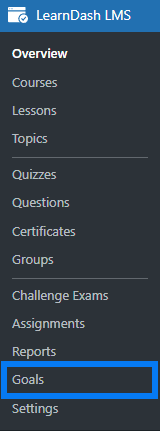
License Option
You can configure your add-on’s license key from the license tab. Enter a valid license key in the corresponding field to receive automatic updates for this product.

Goal Settings
Enable Goal Video Progression on Courses, Lessons or Topics
Navigate to the settings of any specific LearnDash course, lesson, or topic. There, you will see the following two options: only one can be enabled at a time.

- LearnDash Goals Reading and Video Progression
Enabling this toggle will include both reading and video watch time in the LearnDash Goals. - LearnDash Goals Video Progression
Enabling this toggle will include only the video watch time. This works only when you place your videos in the LearnDash Goals shortcodes.
General Settings
User Goal Colors
Set Progress Circle Color
Select the color you want the progress circle to be on the front end.
Backend

Frontend

Primary Theme Color
Here, you can set the primary color for the goal card header, buttons, and accents.
Backend

Frontend


Set Time Goal
Time Lapse in hours
Enabling this checkbox will add hours instead of minutes to the lapse.
Backend

Frontend


Add goal options:
Select the time goals (in minutes or in hours), you want to offer your students to count their progress.
Backend

Frontend

Global Goal Time Tracking
By enabling this checkbox, you can track and monitor the reading progress of all courses, lessons, and topics.

When Global Goal Time Tracking is enabled, the toggles for LearnDash Goal Progress in course, lesson, and topic settings will be unavailable.

Goal Tracking Method
Here you can choose how you want to track weekly goals. You can select from the following 2 options:
- Fixed Calendar Week
Use this option to set a fixed 7-day period that starts on the day selected in the sub-option “Week Start Day”.
- Rolling 7-day Period
Use this option if you want the individual week goal to start from the day the user sets their weekly goal. When this option is selected, the individual user’s weekly goal counter starts on the day the user sets their goal. Each user’s weekly counter will be dynamic on the frontend and not hardcoded to start on the same day as all the other students.
Example:
Suppose Student A sets his weekly goal on Monday, then his respective timer will reset on the next upcoming Monday. At the same time, if student B sets his weekly goal on Tuesday, his timer will reset on the next upcoming Tuesday.
Week Start Day
You can use this option to select the first day of the week for weekly goal scheduling. This option is only available when the “Fixed Calendar Week” option is selected.
If Monday is selected, students can set their weekly goal from Monday, the first day of the week. Time will be tracked from Monday to Sunday and will reset on the next Monday. Similarly, if Tuesday is selected, the students can set their weekly goal starting from Tuesday, the first day of the week. Time will be tracked from Tuesday through Monday and will reset on the next Tuesday.
Example:
Suppose Monday is selected in the backend. Student A sets his weekly goal on Monday, and his timer resets on the next upcoming Monday. Student A will have 7 days to complete his weekly goal. At the same time, if student B sets his weekly goal on Tuesday, his timer will reset on the next upcoming Monday. Student B will have 6 days to complete the weekly goal he set for himself. In short, on the next Monday, all students’ timers will reset.
Default Goal Period
Here, you can choose the default period for goals, whether the student can set the goal daily, weekly, or let the student decide on the frontend. You can select from the options (“Weekly”, “Daily”, and “Both (Student choice)”).
Enable LearnDash Achievement Integration
If enabled, achieving a goal on the frontend will trigger a LearnDash Achievement event. Instead of a congratulations alert, an achievement notification will become visible on the frontend page.
You will need to create an achievement with the “User achieves a goal (LearnDash)” trigger in LearnDash Achievements.

Enable Manual Timer Control
If enabled, the learners will be able to pause and resume the weekly goal timer from the frontend from both the shortcode and the widget.


Enable Debug Log
Enable this option to log plugin activities for debugging purposes, like activities related to license activation. When this option is enabled, a new tab “Debug Logs” will become visible.


Encouragement Notes
You can customize various messages as encouragement notes that are displayed on the frontend with the progress circle.
Default Message
This message will be displayed if the user hasn’t set up any goals yet.
Backend

Frontend

Get Started Note
This message will be displayed if the user has just started or resets/edits his/her goal.
Backend

Frontend

Resume Progress Note
This message will be displayed if the user has already started their goal but has not yet achieved it.
Backend

Frontend

Congratulations Note
This message will be displayed if the user has achieved his/her goal.
Backend

Frontend

Email Templates
From this tab, you can customize the email templates that will be sent to the students in the following scenarios:
- Get Started Email
This email will be sent to the user when they first start a goal, or when they reset or edit it from the frontend.
- Congratulations Email
This email will be sent to the user when they achieve their goal.
Customisable Options:
From Name: If not provided, it will use the default system email name.
From Email: If not provided, it will use the admin’s email.
Subject
Message: HTML is supported if you enable the “Allow HTML” option below.

Shortcodes
This tab displays the relevant information about the available shortcodes this add-on has to offer.
Available Shortcodes

This shortcode displays the user’s weekly progress on any page or post from where he/she can start, edit, or remove his/her weekly goals.


This shortcode displays an individual user’s history of achieved goals. This shows a log of all previously reached study goals.


[ld_goals_video url="https://www.youtube.com/watch?v=ScMzIvxBSi4&ab_channel=BenMarquezTX" video_type="youtube"]Goals Video[/ld_goals_video]
This shortcode displays the goal settings video on any page or post. The time for the weekly goal will be recorded when the above-embedded video is played.
Available Parameters and accepted values:
- url=”Valid Video Url”
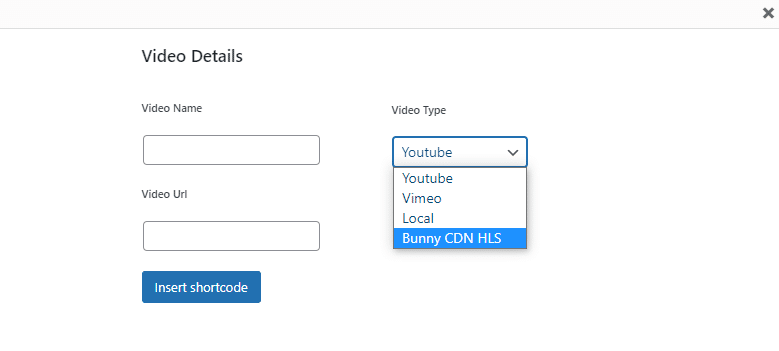
- video_type = “vimeo”, “youtube”, “local”, “bunny_cdn_hls”
You can also insert video lessons by clicking on the “Goal Setting Video” button that appears on a lesson’s edit page when using the Classic Editor.
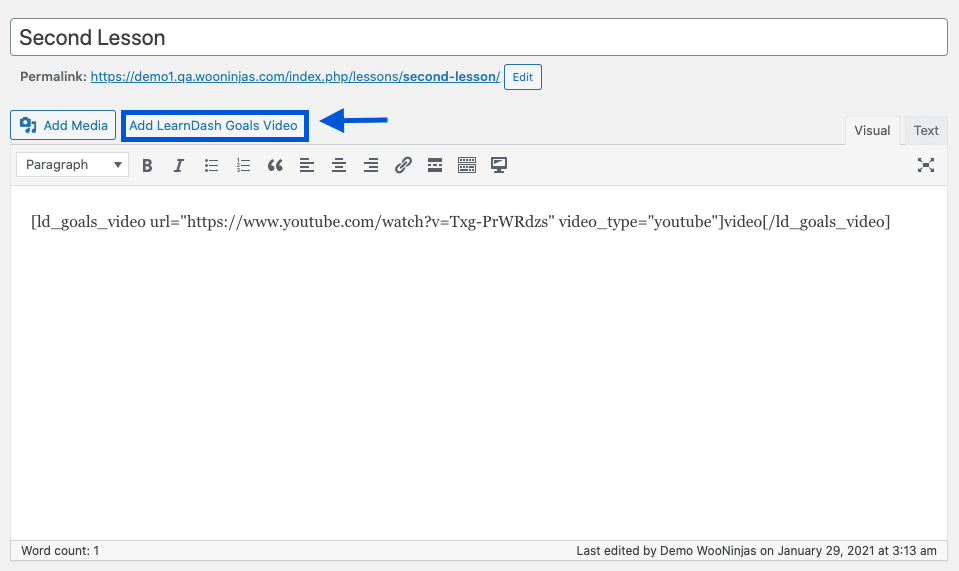
This button lets you enter the video name and URL, and select the video type, directly into the corresponding fields to automatically generate the shortcode and insert it on the lesson’s page.
LearnDash Goals Widget
The LearnDash Goals Widget lets you display a user’s weekly progress on any page or post. Using the widget, students can start, edit, or delete their study goals.
To add the LearnDash Goals Widget, follow these steps:
- Navigate to Appearance from the WordPress admin Dashboard.
- Drag the LearnDash Goals widget from the Available Widgets, and drag and drop it to the desired location.

- Enter a title for the widget area.
- Click Save and Done.
How can students set or edit their weekly goal?
- Navigate to the page or post where the [ld_goals_user_weekly_goal] shortcode or the LearnDash Goals widget is displayed.
Shortcode
Widget
- Click on the ”Set your goal” or “Edit Goal” button to set, edit, or remove the weekly goals.
- The following pop-up will be displayed, allowing the user to edit the weekly goals.

- Click anywhere on the number line to set the time lapse for your weekly goal.
- Click on the “Set goal” button to confirm the configured time lapse.
- Click the “Remove goal” button to remove the previously set time lapse.

Here’s a video showing the goal setting process

Here’s what the process will look like when deleting a goal

LearnDash Goals Blocks
LearnDash Goals User Weekly Goal
You can add this block to any page on which you want to display the set/edit goal screen. Using this screen, the user can set or edit their weekly goal. It will work like the “[ld_goals_user_weekly_goal]” shortcode on the frontend.

LearnDash Goals History
You can add this block to display the respective user’s achieved goals history table. It will show a log of all previously reached study goals. It will work just like the “[ld_goals_history]” shortcode.

FAQ’s
How is the time spent watching video lessons recorded?
Time can be recorded when you embed a lesson’s video with the following shortcode.
[ld_goals_video url=” insert valid URL here” video_type=“specify video location here”]Goals Video[/ld_goals_video]
Can the same video be used in multiple courses at the same site?
Yes, you can embed the video’s URL using the add-on’s shortcode on any page or post.
Should the time units for goal-setting be configured in hours or minutes?
The time goal options should be configured in minutes.
What video sources are supported by this add-on?
The add-on supports videos from YouTube, Vimeo, and videos uploaded locally on your website.
How can I select the week for which the weekly activity towards the goal is recorded?
The add-on automatically selects the current week from the Gregorian calendar and marks the activity for that week.
Why are emails sent with the site’s default name after I’ve configured a name in the “From Name” field on the email template?
Please make sure that the plugin you are using to configure your site’s SMTP doesn’t have the “force from name” option enabled.
Changelogs
1.2.6
- Fix: Preserved paragraph and line-break formatting in email template body content.
- Fix: Improved email template admin styling so WordPress editor fields keep their native layout.
- Fix: Added the settings table wrapper class to the congratulations email settings table for consistent admin display.
1.2.5
- Fix: Fixed some security vulnerabilities.
1.2.4
- New: Added block editor support for “ld_goals_user_weekly_goal” shortcode.
- New: Added block editor support for “ld_goals_history” shortcode.
1.2.3
- New: Manual Pause/Resume timer control for students (admin setting).
- New: Timer pause state now syncs across tabs and devices.
1.2.2
- Fix: Goal time conversion now correctly respects the “hours” setting when tracking progress.
- Fix: Goal history period/unit labels are now fully translatable.
- Fix: Updated translation template (.pot) with latest strings.
1.2.1
- Fix: Improved Licensing Module.
1.2.0
- New: Added daily goal period option alongside weekly goals, with admin setting to control default period (Weekly, Daily, or Both).
- New: Added [ld_goals_history] shortcode to display a table of user’s achieved goals history.
- New: Added LearnDash Achievements integration — goal completion can now trigger a LearnDash Achievement event.
- New: Goal period selector in the edit goal popup when admin sets period to “Both (Student choice)”.
- New: Real-time achievement popup notifications when a goal is reached (supports Noty.js and fallback display).
- Fix: Previous progress is now cleared when setting a new goal to prevent stale data carry-over.
- Fix: Responsive clock text sizing using CSS container queries (clamp-based fluid scaling).
1.1.5
- Fix: Text domain and license form consistency issues.
- Fix: Translation support and updated .pot file.
1.1.4
- New: Added responsive CSS file for improved mobile and tablet display of goal-setting popup modal.
- Fix: Enhanced step progressbar click handling with unified logic for better user interaction.
1.1.3
- Fix: Resolved “Undefined array key” and “Undefined variable” warnings across admin and public areas.
- Fix: Associated all progress and goal data with specific User ID to prevent data crossover between students.
- Fix: Enhanced goal tracking and reset reliability to prevent incorrect progress carry-over.
- Fix: Standardized time formatting (HH:MM:SS) for better display consistency.
1.1.2
- New: Enhanced digital clock display with HH:MM:SS format for better time visualization.
- Fix: Replaced hardcoded fonts with theme-inherited fonts for better consistency.
- Fix: Fixed video seek backward handling to prevent incorrect time accumulation.
- Fix: Improved zero goal handling to properly reset time tracking when no goal is set.
1.1.1
- Fix: Fixed all identified security vulnerabilities.
- Fix: Resolved visibility issue for [ld_goals_user_weekly_goal] shortcode in LearnDash Modern UI.
- Fix: Fixed video goal timer tracking and real-time updates during playback.
- Fix: Adjusted Users Tracking Time table to display the latest records first by default.
1.1.0
- New: Redesigned Goal Overview UI with a professional side-by-side layout.
- New: Added “Primary Theme Color” setting to dynamically control UI accents (header, buttons, labels).
- New: Real-time UI updates for percentage, status, and completion alerts without page refresh.
- New: Time zone-aware weekly reset logic to ensure accurate goal duration.
1.0.9
- New: Updated UI from admin side.
1.0.8
- Fix: Fixed the warning and timer display on course page.
1.0.7
- New: Added an option to set time lapse in hours.
1.0.6
- New: Added global reading progression goals option to start time tracking on all courses, lessons and topics.
1.0.5
- New: Added course, lesson and topic reading progression goals option.
- Fix: UI/UX fixes for LearnDash goals Progress.
1.0.4
- New: Added support for HLS video format.
- Fix: Warnings on the LearnDash goal widget.
- Fix: Made add-on compatible with the latest version of PHP, WordPress, and LearnDash.
1.0.3
- Fix: License API issues.
- Fix: Rating notice visibility issues.
- Fix: Made add-on compatible with the latest version of PHP, WordPress, and LearnDash.
1.0.2
- New: Multilanguage support added.
- Fix: Made add-on compatible with the latest version of PHP, WordPress, and LearnDash.
1.0.1
- New: UI/UX changed for LearnDash goals Progress.
- New: Now LearnDash goals can be added a widget.
- New: Buddyboss compatible style is added for shortcode/widgets.
- Fix: [ld_goals_user_goal_progress] shortcode is removed and merged into [ld_goals_user_weekly_goal] shortcode.
- Fix: Minor code fixes.
- Fix: Compatibility issues with latest WordPress and LearnDash version.
1.0.0
- Initial release.
